Best Spy Apps for Android in 2026
A plain-language 2026 comparison of Android spy apps, with a side-by-side look at what each product actually shows — and why MobileTracker360 is the strongest full dashboard.
By MobileTracker360 Editorial Team · 10 min read
Start here: who should pick which app
Spy app is a search term, not one kind of product. Some apps show full phone records. Some send safety alerts. Some mainly set screen-time rules. Mixing those jobs is how most comparison pages confuse people.
MobileTracker360 is our product. This page is a 2026 shortlist of six Android tools with enough official documentation to compare: MobileTracker360, mSpy, Eyezy, uMobix, Bark, and Qustodio. Competitor details come from their own sites, not from paid review blogs. We first published this comparison on August 24, 2026, and rechecked the sources on September 7, 2026.
If you only need the category explained, read the spy app guide. If you already want a full Android tracker, open the mobile tracker overview or the interactive demo.
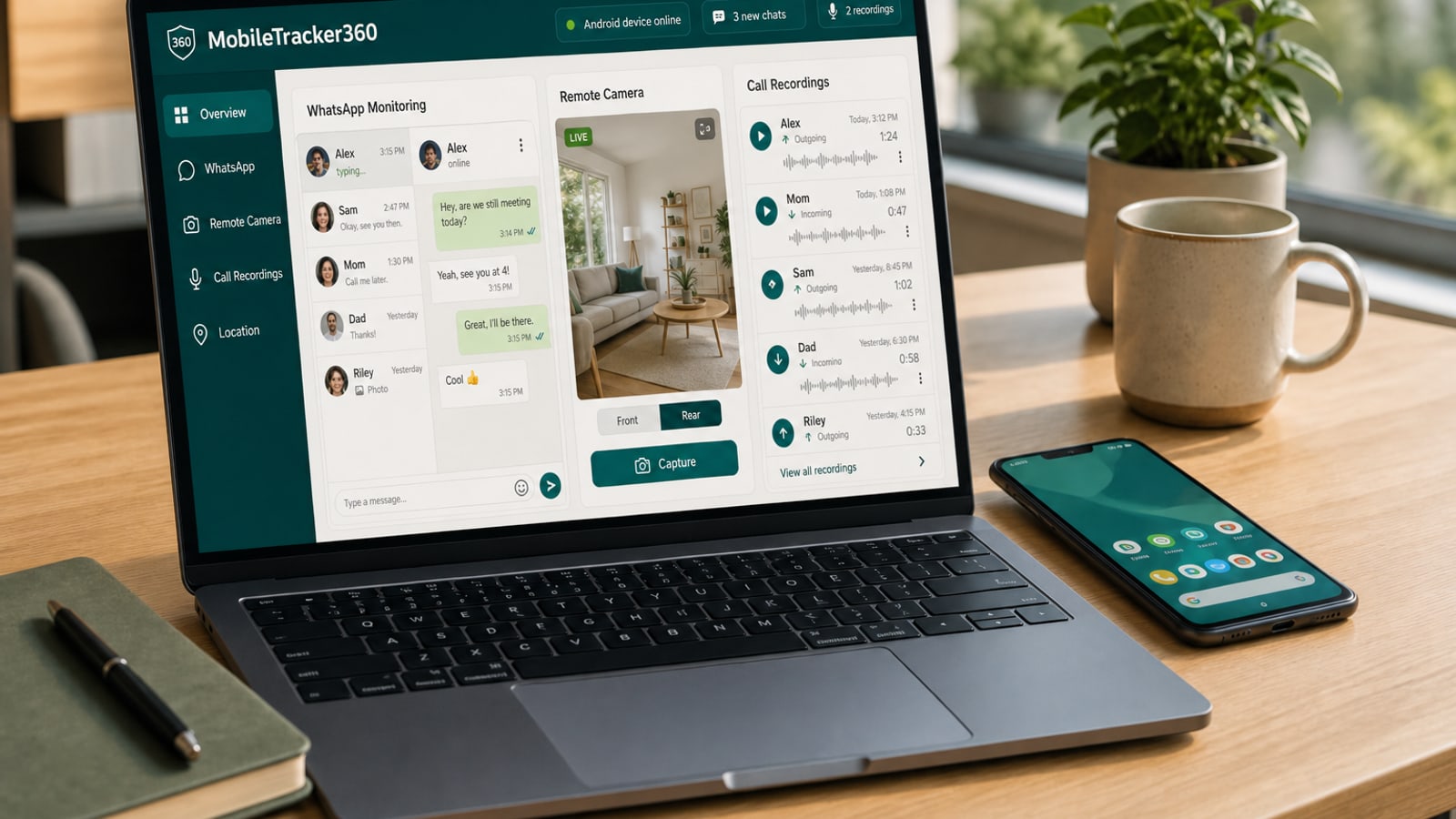
- Pick MobileTracker360 if you supervise one Android phone and want the full dashboard: location, WhatsApp, SMS, calls, call recordings, photos, screenshots that appear immediately, live screen, remote camera, and lock-camera photos when the phone is locked, unlocked, or the wrong password is entered.
- Pick Bark if you want safety alerts across several children and do not need every message or a live camera.
- Pick Qustodio if the household has phones and computers and the main job is time limits, web filters, and app blocking.
- Look at mSpy, Eyezy, or uMobix if you want a long monitoring catalog and are willing to check plans, rooting, and sync delay on the exact phone.
Comparison at a glance
Read this as a map, not a scorecard. Yes means the vendor currently documents the capability. No means we did not find it on the official pages we checked. Plan, Android version, and phone maker still decide what actually works.
- Full activity dashboard (calls, messages, apps, media): MobileTracker360, mSpy, Eyezy, uMobix. Bark and Qustodio focus on alerts and rules, not every record.
- WhatsApp and social conversations you can open: MobileTracker360, mSpy, Eyezy, uMobix. Bark and Qustodio mainly alert on concerning content.
- Call recordings: MobileTracker360 and Eyezy list them. Bark and Qustodio do not. mSpy and uMobix need a plan-level check.
- Live screen, remote camera, live audio: MobileTracker360 includes all three where the phone supports them. Eyezy currently says remote camera is not available. Bark and Qustodio do not list these live tools.
- Lock-camera photo on lock, unlock, and wrong password: MobileTracker360. Not listed on the current mSpy, Eyezy, uMobix, Bark, or Qustodio feature pages we reviewed.
- How fast new data appears: MobileTracker360 sends records in the background, so a screenshot shows up in the dashboard immediately while the phone is online. uMobix says ordinary reports sync about every five minutes.
- Multi-platform family suite (iPhone, Windows, Mac, Chromebook): Qustodio and Bark. MobileTracker360 is Android-first.
Why MobileTracker360 is the best Android dashboard in this list
We are not claiming a fake independent number-one badge. We are saying this: if the job is to see what is happening on an authorized Android phone, in one private dashboard, with almost no waiting, MobileTracker360 is the product built for that job.
Most competitors split the work. Bark and Qustodio are strong at alerts and family rules, but they do not give you the same conversation, media, and live-session depth. mSpy, Eyezy, and uMobix publish long catalogs, then hide important limits in plan pages, root notes, or a five-minute sync timer.
MobileTracker360 keeps records and live tools in the same place you already use: location and history, geofencing, app activity and screen time, app blocking, calls plus call recordings, SMS and messages, WhatsApp and other social apps, photos and videos, screenshots, keylogs, browsing, contacts, Wi-Fi, installed apps, live screen, remote camera, live audio, and device-security captures.
The two gaps that matter most in daily use are lock-camera photos and real-time delivery. Those are in the next two sections.
Lock-camera photos: lock, unlock, and wrong password
The dashboard has a Lock Camera section. The companion app can take a front-camera photo when the supervised phone is locked, when it is unlocked, and when the wrong password or PIN is entered. That is useful when you need to know who tried to open the device, not only that the screen turned on.
This is not the same as starting a remote camera session yourself. Lock-camera captures happen from those lock-screen events and then appear with the rest of the device data. Availability still depends on camera permission, Android version, and the phone maker.
On the official pages we checked for this shortlist, mSpy, Eyezy, uMobix, Bark, and Qustodio do not document this lock, unlock, and wrong-password photo flow. Hoverwatch, which is outside this six-app list, does advertise an unlock photo. For families comparing the names people actually search in 2026, lock-camera coverage is a MobileTracker360 difference. See device security alerts for how those captures sit next to new-activity indicators.
Real-time data: a screenshot appears immediately
Many monitoring apps collect in batches. uMobix, for example, says ordinary data reports synchronize about every five minutes. That delay is easy to miss in a feature list, and it is frustrating when you just captured a screenshot and the dashboard still looks empty.
MobileTracker360 is built around background, real-time delivery. When the enrolled Android phone is online, new records are sent as they happen. Capture a screenshot on the device and it should show up in the Screenshots section of the dashboard immediately, not after a polling window.
Offline phones are the honest exception. If the device has no network, nothing can arrive until it reconnects. We do not treat this as an emergency service. For everyday supervision, though, real-time background sync is the difference between checking now and waiting around.
What the MobileTracker360 dashboard actually includes
This list matches the product dashboard, not a marketing slogan. Features still need the right permissions on an authorized family phone.
- Overview: dashboard, screen time, and an app-activity timeline.
- Live tools: live screen, on-demand remote screenshot, remote camera, and live audio.
- Device controls: installed apps, Wi-Fi block, call recordings, and lock-camera captures.
- Communications: SMS, email, WhatsApp, Facebook Messenger, Facebook Lite, IMO, Instagram, and TikTok.
- Device records: screenshots, photos, videos, calls, contacts, keylogger, and browser history.
- Place context: location history, geofences, and nearby Wi-Fi networks.
How we compared, in one minute
We compared products on what a parent can actually use: Android compatibility, location, calls and messages, screen or live tools, family controls, sync speed, and whether the vendor's own pages contradict each other.
A listed feature is not a promise on every handset. Android version, manufacturer settings, battery optimization, plan tier, and network quality all matter. Confirm the exact phone before you buy.
- Choose full records when you need to open supported calls, messages, media, or app history.
- Choose risk alerts when you only want concerning content flagged.
- Choose family controls when time limits and web filters matter more than live monitoring.
- Treat history and live sessions as different tools. One saves what happened. The other streams what is happening now.
mSpy: a long catalog with plan caveats
mSpy lists social conversations, texts and email, calls, location and geofencing, browser and app controls, media, keylogging, screenshots, live screen, and recording-related tools. Its compatibility policy says Android setup needs physical access and Android 5 or later, and that manufacturer permissions can block features on an otherwise compatible phone.
That breadth is the reason people search for mSpy. It may suit someone comparing Android and iPhone offerings on one vendor site.
The catch is hidden in the plan pages. Advanced camera and ambient audio are promoted through mSpy Extreme, and the remote-camera pages are not fully consistent. Do not assume every headline feature is in the plan you buy. Review mSpy features, the compatibility policy, and Extreme plan information, then read MobileTracker360 vs mSpy.
Eyezy: communications and screen history, with root notes
Eyezy documents keylogging, periodic screen captures, text and social-app monitoring, calls, GPS history and geofencing, browser activity, saved files, app or website controls, live screen, call recording, and AI-chatbot history.
It may fit a family that wants communication context and screen captures, including activity around services such as ChatGPT or Gemini. Family Kit covers more devices than the standard one-device Premium plan.
Read the caveats. Eyezy's FAQ says remote camera is not currently available. Older compatibility text and the newer FAQ do not fully agree about which social features need rooting, and the Android install page says some extra messenger and email coverage needs a rooted phone. Sources: Eyezy features, Android installation, and the Eyezy FAQ. See MobileTracker360 vs Eyezy.
uMobix: broad Android records, slower ordinary sync
uMobix documents call and SMS history, deleted records, social and messenger activity, location history, browser activity, media, keylogging, device information, app and website controls, and camera or microphone streaming on Android. It also lists remote controls for Wi-Fi, calls, messages, apps, and the device.
That mix can look close to a full dashboard. Two limits matter in practice. Physical access is required to install. Ordinary data reports synchronize about every five minutes, which is the opposite of an immediate screenshot.
One subscription covers one linked phone. Current pages also disagree on the minimum Android version — one says Android 4+, another says 5.1 or later. Review the uMobix feature catalog and Android tracker page, then see MobileTracker360 vs uMobix.
Bark: safety alerts for several children
Bark does a different job. Its Android app scans supported texts, social activity, email, searches, images, video, and audio for possible safety issues, then sends contextual alerts. It also offers app and website filtering, screen-time routines, real-time location, place alerts, check-ins, and a one-week location history.
Bark is strong when you want coverage across several children and connected accounts, without rooting. A single subscription can span multiple devices.
You will not get every WhatsApp thread, call recording, live screen, or remote camera. Bark is sold in the United States and its territories, Australia, and South Africa, supports Android 8 or later, and needs the Bark Kids app plus background permissions. Sources: Bark for Android and Bark Android compatibility. See MobileTracker360 vs Bark.
Qustodio: rules across many kinds of screens
Qustodio is a digital-wellbeing suite. On Android it currently includes app and game blocking, web filtering, daily limits, routines, internet pause, activity and YouTube reporting, location and saved-place alerts, calls and SMS, and AI-based alerts for supported social conversations.
Its advantage is platform breadth: Android, iPhone and iPad, Windows, Mac, Chromebook, and Kindle, with a Complete plan for unlimited family devices. That is the right shape if the problem is consistent rules, not a live look at one phone.
Qustodio supports Android 9 or later and notes issues with Android Go, some forked builds, and some foldables. Calls and SMS on Android need its separately distributed Kids App. Social monitoring is alert-based, not full conversation browsing. It does not list live screen, call recording, remote camera, or ambient listening. Review the Qustodio feature matrix, system requirements, and plans. See MobileTracker360 vs Qustodio.
Honest limits: when MobileTracker360 is not the pick
MobileTracker360 is Android-first. If you need the same rules on iPhone, Windows, Mac, Chromebook, and Kindle, Qustodio or Bark is a better fit.
Live tools and lock-camera photos still need the companion app, permissions, a network connection, and a compatible phone. We do not sell this as a stealth or anti-tamper product, and we do not treat it as an emergency locator.
If location check-ins are the only need, a focused location tracker may be enough. If you only want bedtime limits, start with screen-time tools rather than a full monitoring dashboard.
Questions to ask before you install anything
The best Android spy app is the one whose real behavior matches your phone, your purpose, and your family agreement. If a feature page and a compatibility page disagree, ask the vendor before you pay.
- Does it support this exact Android version and manufacturer build?
- Does setup need physical access, Accessibility, screen capture, root, or a special installer?
- Which advertised tools are actually in the plan you are buying?
- Do you get full records, periodic screenshots, risk alerts, or live sessions?
- When you capture a screenshot, how soon does it appear — immediately, or after a sync timer?
- Does it capture a photo on lock, unlock, and a wrong password, or only some of those events?
- How many devices are included, and can you remove access cleanly later?
Use phone monitoring only with the right authority
Install monitoring software only on a device you own or are responsible for, such as a child's phone, and only where you have the authority or permission to supervise it. Tell the family what is monitored. Turn on only the categories you need. Lock the dashboard. Follow local privacy and recording laws.
This comparison uses official information first checked on August 24, 2026, and rechecked on September 7, 2026. Product pages change. Recheck the sources and the phone in your hand before you decide. You can walk through the interactive demo or the Android parental control page if you want to see the MobileTracker360 workflow next.